Live rates at checkout
Rates from your connected carriers, with your markup, a handling fee, a free-shipping threshold and a fallback rate.
Free WordPress plugin · version 0.2.0
A free plugin that connects your WooCommerce shop to your delivery companies: live rates at checkout, shipments sent to the carrier in one click or automatically once an order is confirmed, automatic tracking, a dashboard and alerts.
How it works
ShipConnect follows the way a shop already works: an order comes in, you confirm it, and the delivery side takes care of itself.
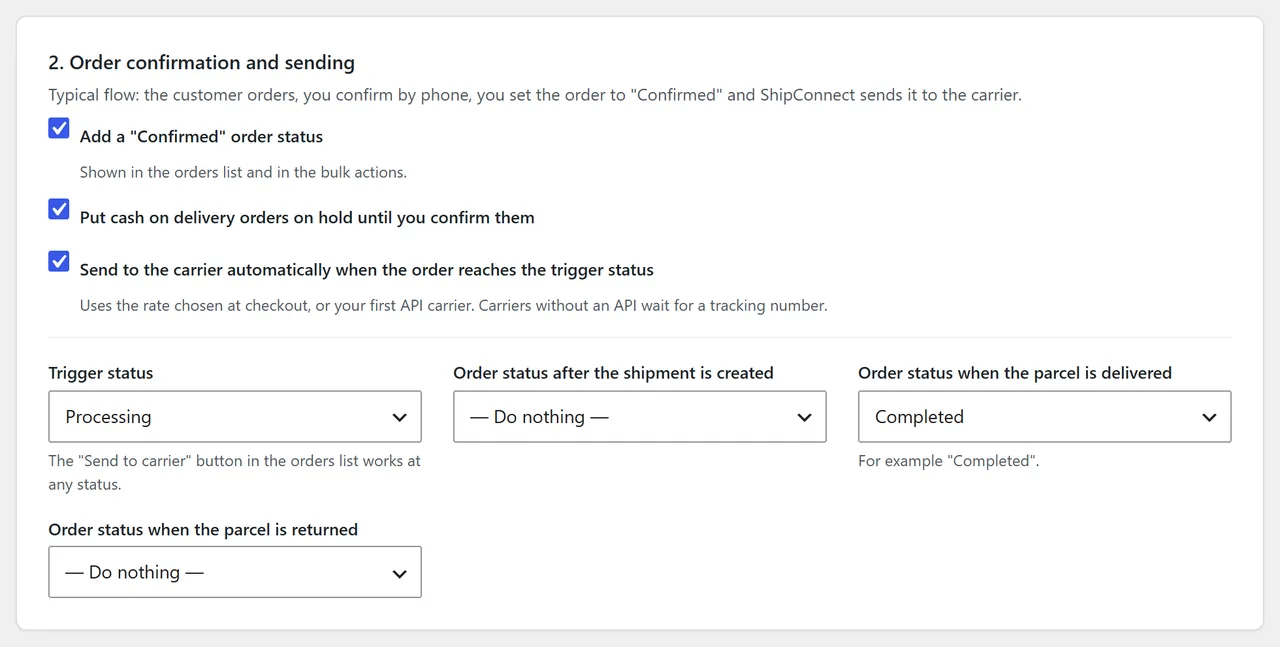
At checkout they see live rates from your connected carriers. A cash-on-delivery order arrives on hold.
Call the customer if you need to, then set the order to “Confirmed”, one by one or in bulk from the orders list.
Automatically when the order reaches the status you chose, or when you click “Send to carrier”.
Parcel status is checked every 30 minutes and through carrier webhooks. The order and your customer stay up to date.
What it does
One panel in WooCommerce > ShipConnect Shipping. Everything below is in the free version 0.2.0.
Rates from your connected carriers, with your markup, a handling fee, a free-shipping threshold and a fallback rate.
A dedicated status for confirmed orders. Cash-on-delivery orders can be held until you confirm them.
A button in the orders list, a bulk action, or fully automatic sending when the order reaches the status you chose.
For API carriers, the rates for the order are shown and you pick the service before the shipment is created.
Fix a status or a tracking number, or cancel a shipment (also with the carrier when it supports it), then create a new one.
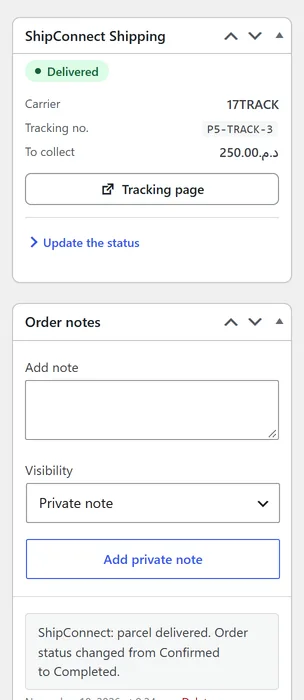
A check every 30 minutes plus carrier webhooks. Order notes and the order status follow the parcel.
A “Track my parcel” box on the customer’s order page and the tracking number in order emails.
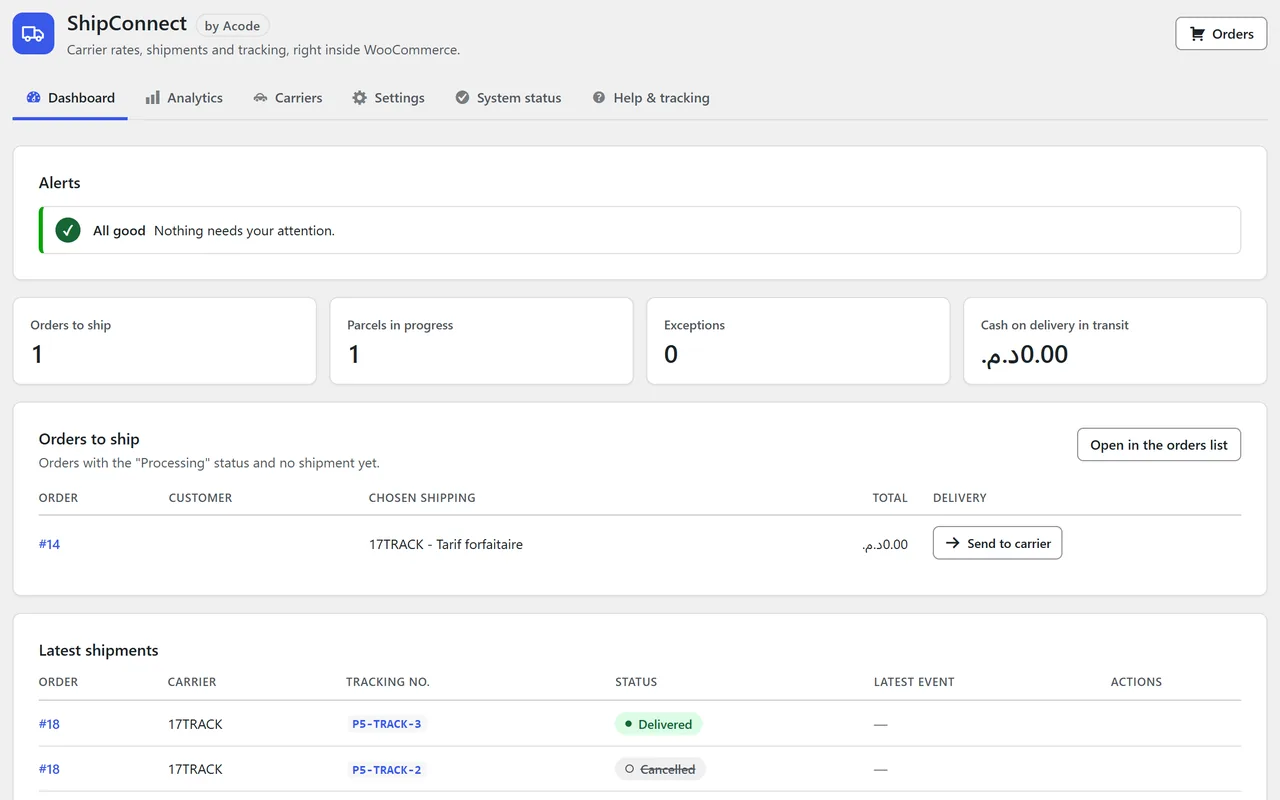
Key figures, charts by day, status and carrier, alerts for problems and an email when a parcel is in exception.
Orders list
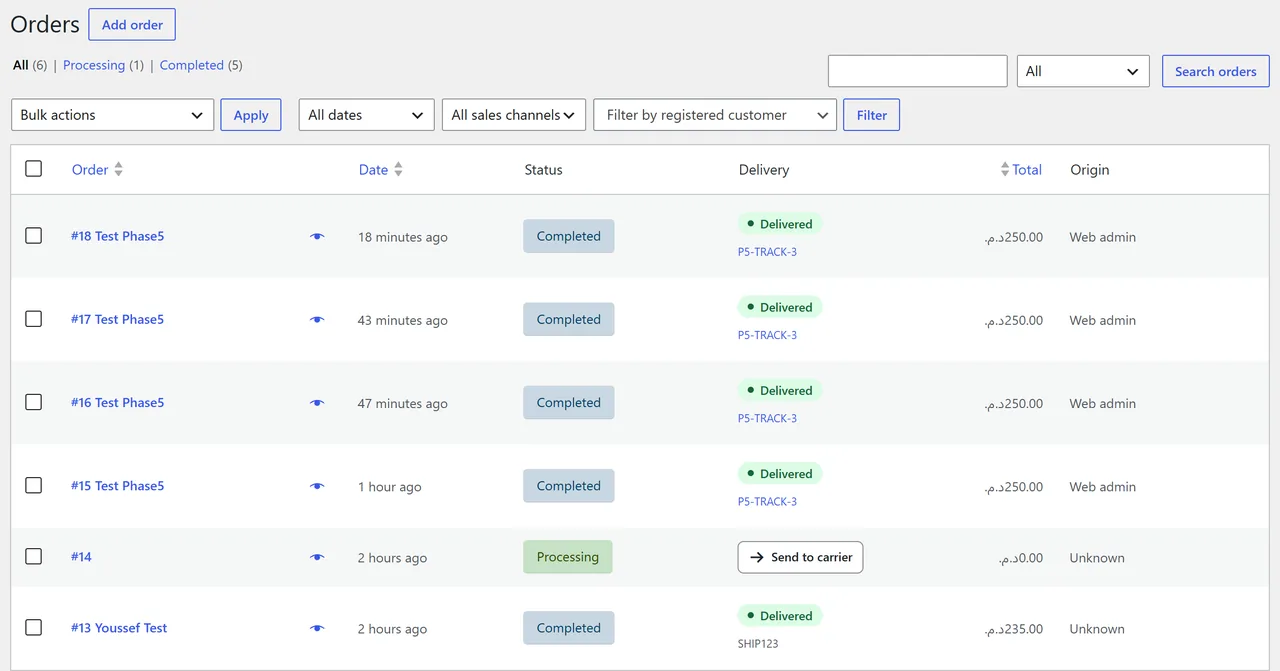
ShipConnect adds a “Delivery” column to the WooCommerce orders list. It shows the parcel status and tracking number, or a button to send the order.
On each order
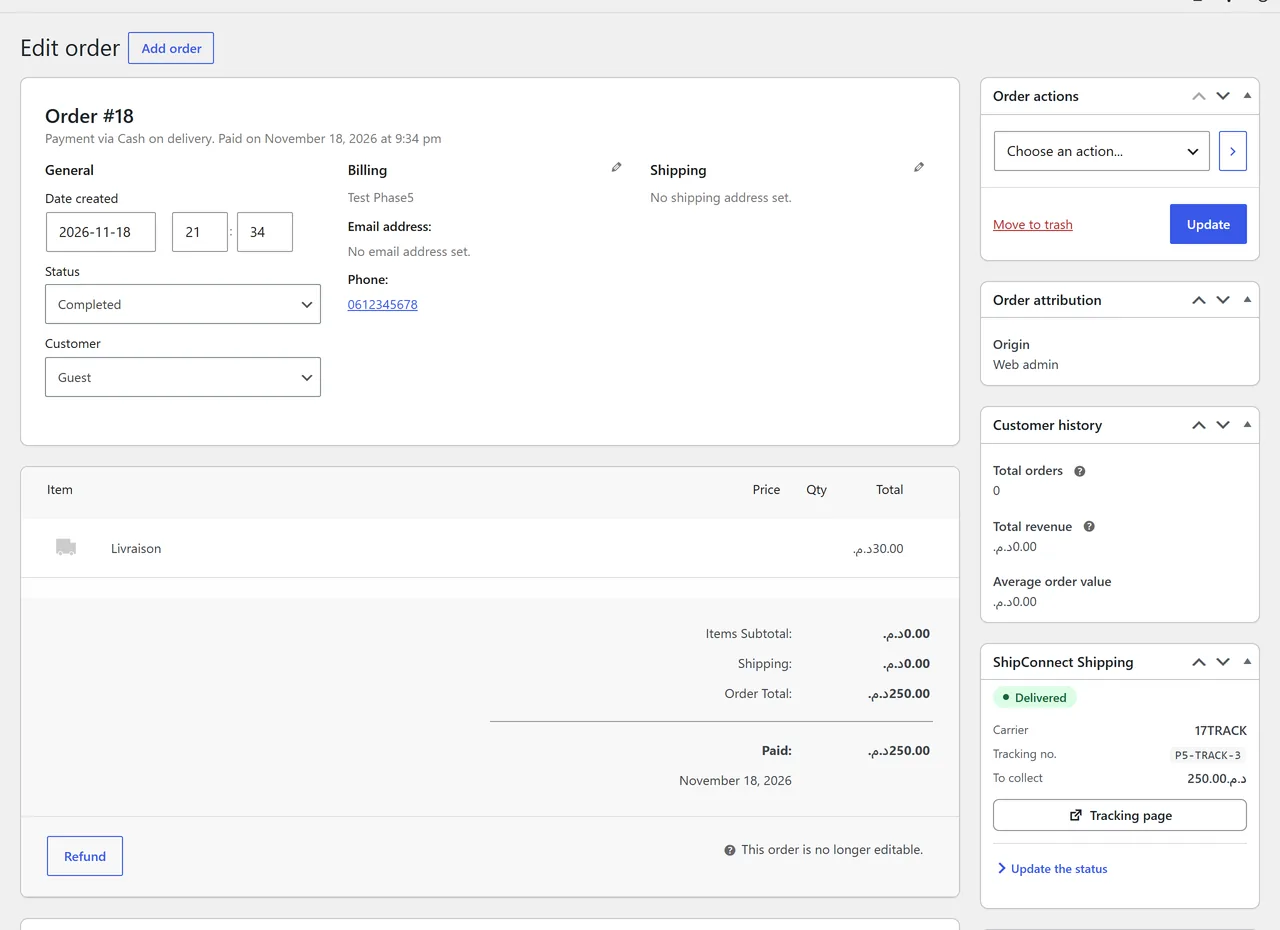
The ShipConnect box on the order page shows the shipment, the carrier, the tracking number and the amount to collect.
Morocco · cash on delivery
Where most orders are paid on delivery, sending a parcel before the customer has confirmed costs money. ShipConnect holds those orders until you say so.
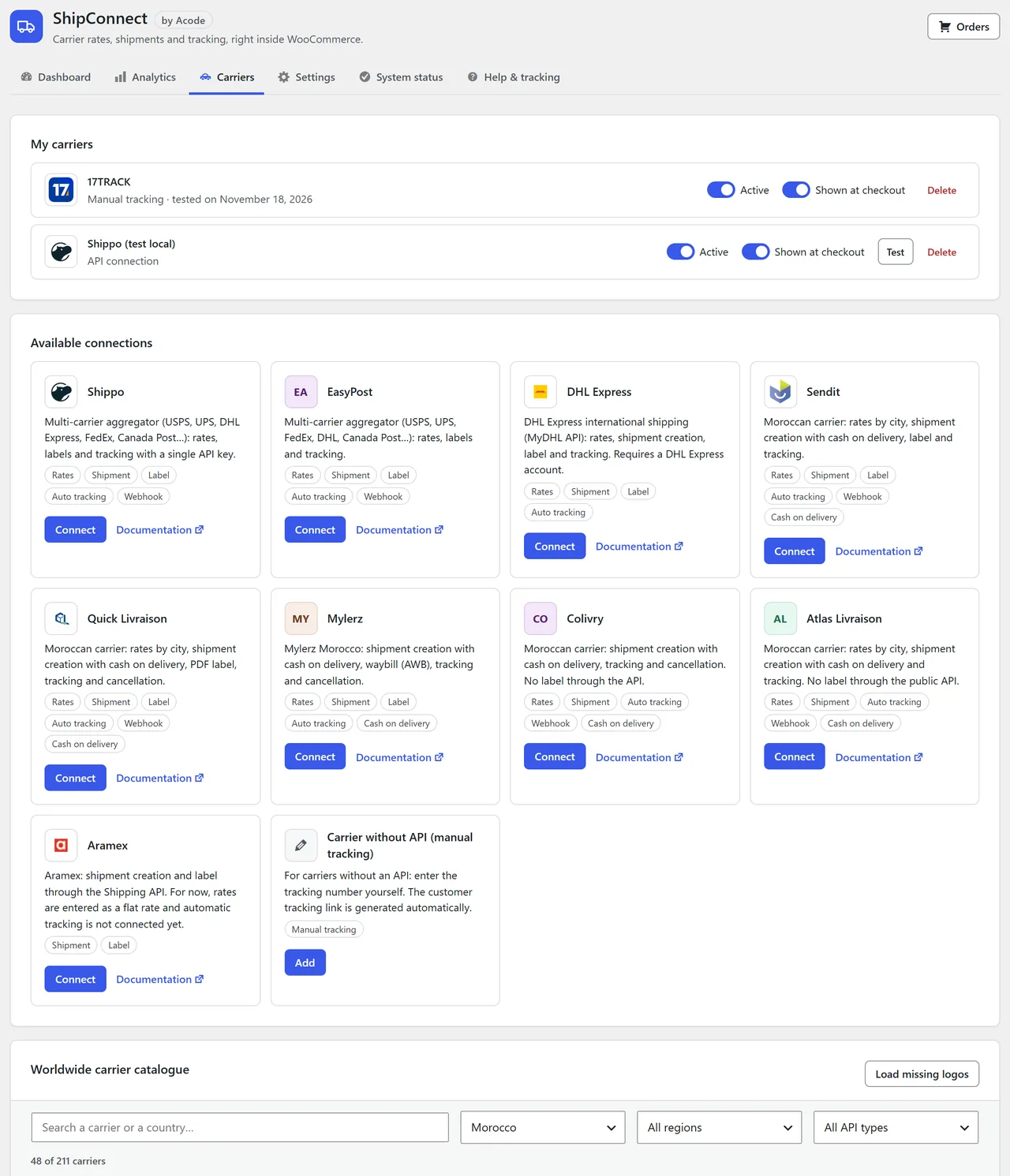
What each one covers. Labels come through the API with Sendit, Quick Livraison and Mylerz; Colivry and Atlas Livraison have no label through their API. For any other Moroccan carrier, use manual tracking: you enter the tracking number and the customer gets a tracking link.

Carriers
Five Moroccan carriers with cash on delivery, two multi-carrier aggregators and two international carriers. You connect each one with your own account, and ShipConnect tests the key before saving it.
Rates by city, shipments with cash on delivery, labels, tracking and cancellation.
Rates by city, shipments with cash on delivery, PDF labels, tracking and cancellation.
Shipments with cash on delivery, waybill (AWB) labels, tracking and cancellation. Live rates when your warehouse is configured.
Shipments with cash on delivery, tracking and cancellation. No label through the API.
Rates by city, shipments with cash on delivery and tracking. No label through the public API.
Aggregator: rates, labels and tracking for the carriers of your Shippo account, with one API token.
Aggregator: rates, labels and tracking for the carriers of your EasyPost account.
International shipping through the MyDHL API. Requires a DHL Express account. Tracking by regular checks.
Shipment creation and labels. In this version rates are entered as a flat rate and automatic tracking is not connected yet.
Enter the tracking number yourself. The tracking link is generated for the customer, with an optional flat rate at checkout.
The names above are the connections built into version 0.2.0. They follow each carrier’s official API documentation: test each one with the carrier’s test keys before going live. More connections may be added in later versions.
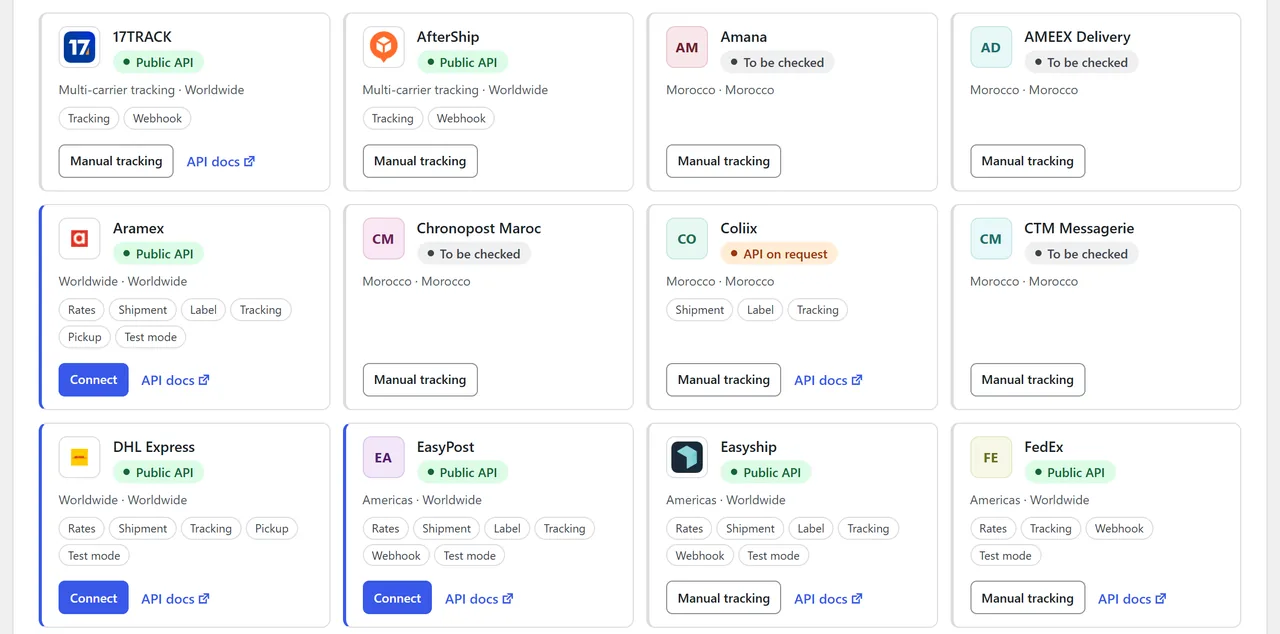
Not sure which carrier to work with? The Carriers tab lists 211 companies and what is known about their API.
For guidance only. Catalogue entries come from desk research. Check the details with the carrier before you sign anything.
Dashboard, analytics, alerts
A dashboard for today’s work and an analytics tab for the last 7, 30 or 90 days.
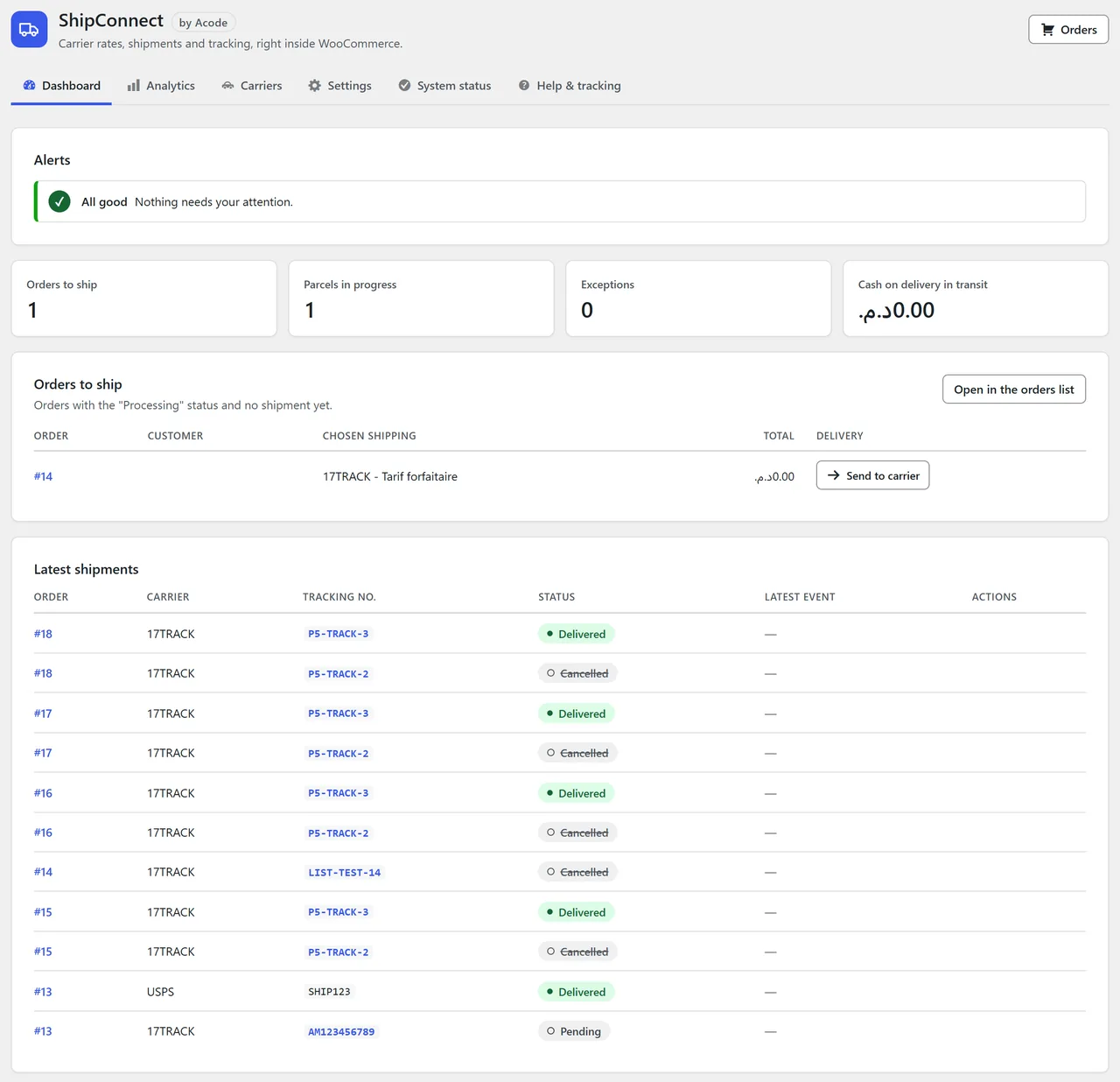
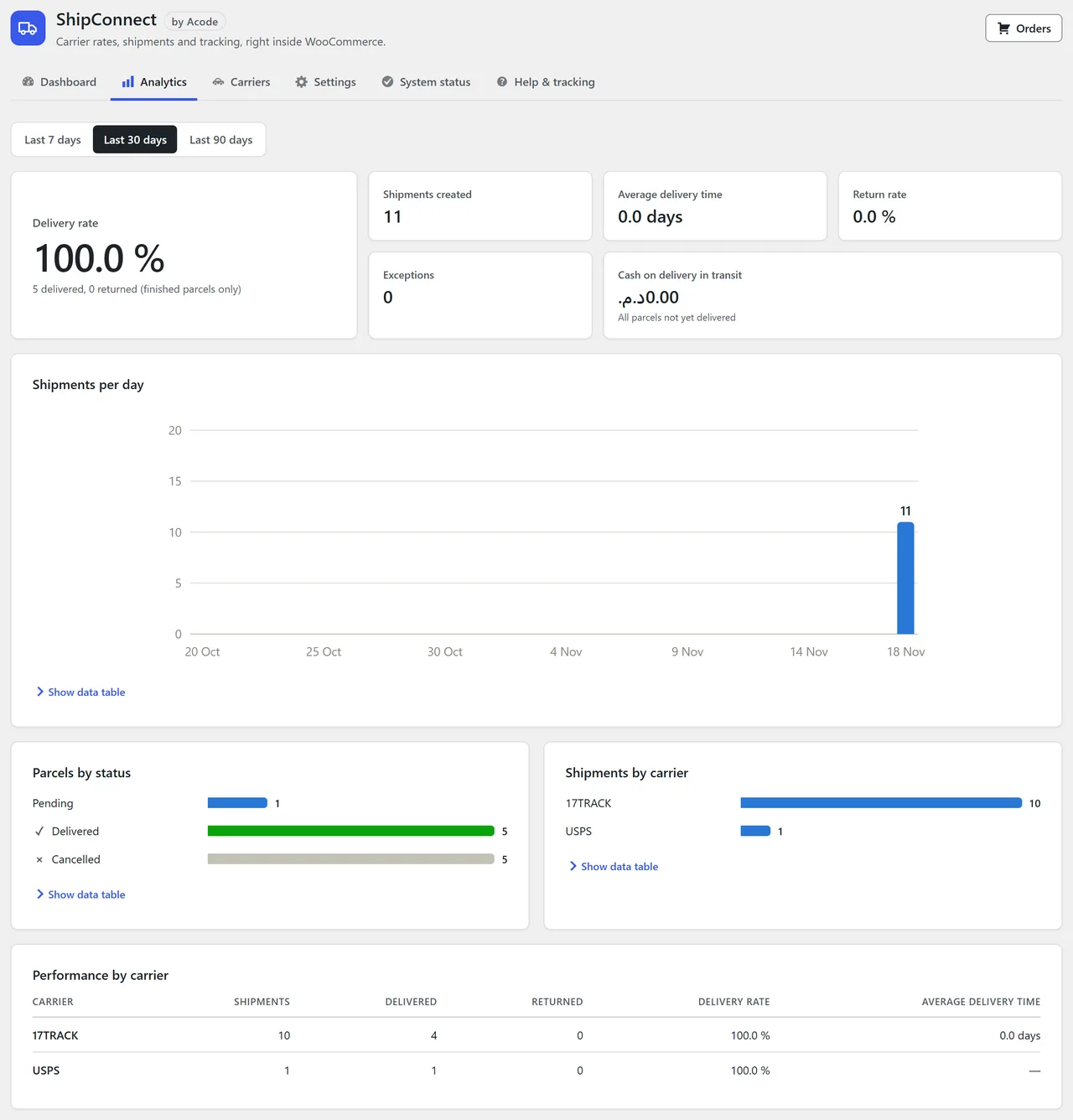
Delivery rate, shipments created, average delivery time, return rate, plus charts by day, status and carrier. Each chart has its data table.
The amount still to be collected by carriers, on the dashboard and in the analytics.
Failed sends, parcels in exception or without news, returns and setup problems, sorted by severity, with a badge in the menu.
An email when a parcel goes into exception, to the address you choose.
Security and privacy
ShipConnect runs on your site. It contacts a carrier only after you connect it with your own account, and it sends nothing to acode.
Carrier credentials are encrypted with libsodium before they are saved and are never shown again in the interface. You can set a dedicated key with SHIPC_ENCRYPTION_KEY in wp-config.php.
Every action in the panel checks a nonce and the WooCommerce manager capability. Inputs are sanitised and outputs escaped.
Shipping labels are stored in a private folder under a random name and served only to shop managers. On Nginx, add the rule given in the installation notes.
To quote, create and track a shipment, the recipient’s name, address, phone and email and the parcel details are sent to the carrier you chose. Mention it in your privacy policy.
Each connection has its own webhook address with a secret key. A webhook only triggers a tracking check with the carrier; you can regenerate the addresses at any time.
Deleting the plugin removes its settings, connections, shipments table, labels, logos and order metadata.
Requirements
Questions
Yes. ShipConnect for WooCommerce is free and licensed under the GPL (version 2 or later). You pay your carriers for your shipments as usual; the plugin itself costs nothing.
Version 0.2.0 has nine API connections: Sendit, Quick Livraison, Mylerz, Colivry and Atlas Livraison in Morocco, the Shippo and EasyPost aggregators, DHL Express (MyDHL API) and Aramex (shipments and labels). Any other carrier can be added as a carrier without API, with manual tracking. More connections may be added in later versions.
Yes. Add it as a carrier without API, enter the tracking number given by the carrier, and the customer gets a tracking link. You can also set an optional flat rate for the checkout.
Yes. Cash-on-delivery orders can be held until you confirm them. The amount to collect is shown on the order and sent to carriers that support it; in version 0.2.0 these are Sendit, Quick Livraison, Mylerz, Colivry and Atlas Livraison.
Keys are encrypted with libsodium before being saved and are never shown again in the interface. For extra separation you can define your own encryption key in wp-config.php.
The API connections are built from each carrier’s official API documentation and checked against simulated responses; they have not yet been validated with real carrier accounts. Version 0.2.0 is an early release: test each connection with the carrier’s sandbox or test keys, on a test order, before you use it in production. The plugin tests the key when you connect a carrier.
The plugin interface is in English and French and follows your WordPress language. This page is also available in Arabic, but the plugin interface is not translated into Arabic yet. Other languages can be added with a standard translation file.
One parcel per order. With Aramex, live rates and automatic tracking are not connected yet. Colivry and Atlas Livraison provide no label through their API. Customs declarations are generated for DHL Express only. The block-based WooCommerce checkout has not been verified yet.
ShipConnect only contacts a carrier after you connect it with your own account, and sends it the order data needed to quote, create and track a shipment. It sends nothing to acode. Carrier logos are downloaded by your server only if you click the button for it.
Enter your email in the form below and we send you the download link. In WordPress, go to Plugins > Add New > Upload, install the ZIP and activate it (WooCommerce must be active). Then open WooCommerce > ShipConnect Shipping and follow the “Get started” checklist.
Another question? Write to contact@acode.tech.
Free download
Leave your email address and we send you the download link for version 0.2.0. Free, GPL licence.
Check your inbox: the download link is on its way. If nothing arrives within a few minutes, look in your spam folder.